As a busy teacher, I am always looking for tools that can make my job easier. Artificial Intelligence tools can do just that, but it is okay to be skeptical. AI is developing at a rapid pace, but it is still not effective at everything. So, what is AI best at? What is it not good at? How can it make your life easier? What do you need to consider before using it?
AI is a large language model, which means it is great with anything language-based. You can speak to it conversationally and it can respond without you having to change how you would normally talk.
ChatGPT, Gemini, Magic School, Brisk, and Grammarly are all tools that you might want to try. Just like anything, it is important to check all responses for accuracy, be transparent in your use of them, and check for any biases or discrimination.
If you do not get the response that you want the first time, ask AI to try again, but add a new prompt. It might take multiple tries to get the answer that you are looking for. The following ideas include my experiences with AI.
Rewrite Text (Great)
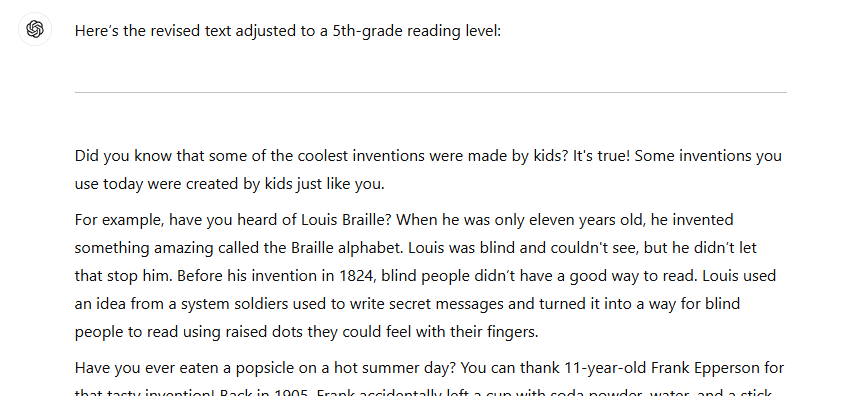
AI is great at rewriting text. I have asked it to rewrite passages to change the level of complexity and to change the tone and it has been able to do both successfully.
This is really helpful when I am using text in a unit and want to differentiate the reading level for students. I prompt AI to write at a certain grade level and it will change the text level accordingly.
This is an example of ChatGPT rewriting an article that I had written about inventions to make it appropriate for fifth graders.
Summarize Information (Great)
AI is also great at summarizing information. When you add the information that you want it to summarize, it can give you a clear and concise picture.
One of my colleagues used ChatGPT to summarize the behavior logs of a student for parents. She then was able to present what had been happening in her classroom in a factual, non-biased way.
Give Feedback (Good)
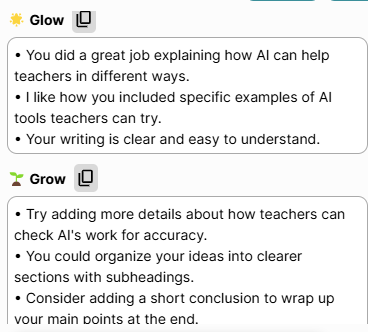
AI is good at providing feedback when given text to review. The Brisk Teaching Google Extension is particularly good at providing feedback on Google Docs. You can add the Brisk extension and it will provide glows and grows to share with students.
Brisk is also able to show you the writing process of a Google document. It can alert teachers to signs of plagiarism if large quantities of text are posted at the same time.
These are the glows and grows that the Brisk Teaching Google Extension provided about this blog.
Correct Grammar and Punctuation (Good)
Did you know that Grammarly is an AI writing tool? AI is good at finding errors in writing. I just added a comma based on a suggestion, but it does have limits. Just like any tool, it is important to check the suggestions before just changing them.
I have let my students use Grammarly. It has actually helped them remember to do things on their own when they see that they make the same mistake multiple times.
Generate Images (Average)
Gemini has an image-generating tool that is pretty limited. It will not currently generate people. Canva has just moved to Magic Media and it generates images with just a few words in a prompt, but they do not always look very realistic.
My favorite image generator is Ideogram. If you don’t pay for the premium service you may have to wait awhile for your image to generate, but these images have given me the most diversity. Of course, AI images are still pretty easy to identify and are not comparable to real artwork.
This image was created on Ideogram with the prompt “artificial intelligence talking to a human.”

Math Problems (Bad)
The biggest flaw of AI right now is that it is not very effective at writing or answering math problems. It even had trouble when asked to write something in a certain number of characters. AI can not do math (yet). Just like everything else, if you are asking AI to use math, make sure you check before accepting the answer.
Read more about how I had students evaluate the “Which One Doesn’t Belong?” problems that ChatGPT created in the “Students Create” section. Evaluating AI can be a great learning experience. Students had to find the errors and then change the problem to make it effective.
Creating Resources for Students (Bad)
While AI can assist in adapting resources for students, it is not able to create resources that are ready for students to use. It is important that a teacher who knows and cares about them first checks to make sure it is appropriate, accurate, and best meets their needs. While AI may be able to help you, it definitely can’t replace you!
If you are interested in learning more, AI for Education is a great source for information and to learn how to write effective prompts. Students can also learn more and debate the ethics in this Socratic Seminar.
Have you tried AI tools in your classroom? I’d love to hear your insights and experiences as we navigate this exciting frontier together! AI is constantly evolving and becoming capable of more. While it can’t replace you, it can definitely assist you.

 Enhancing Enrichment
Leave a comment